How do I use this Instagram Reels script template?
Write the last frame first. What would someone want to take away after watching? In our Instagram Reels script template the answer is a palette with three usable color codes. Plan the shots around the three details someone needs to see to make that palette.
Choose Worked example to edit the script that accompanies the video. Choose My script for a blank Instagram Reels script template. Both copies keep their own edits in this tab. The sample includes the cover, five timed cuts, audio direction and post caption.
Start your Instagram Reels script template with an image, screen recording or short demonstration. If you have only a topic, the Instagram script generator can propose a draft. Use the Instagram Reels script template once you have material to edit.
Follow the Instagram Reels script template shot by shot
Play the Reel once with the script hidden. On the second viewing, pause when the ring changes position. The times in this Instagram Reels script template refer to the downloadable card demonstration above. An editor can match each label to its shot.
| Time | What appears | Why it stays |
|---|---|---|
| 0–3 s | The full still and “Where would you sample?” | Give the eye time to pick a spot before the first answer. |
| 3–5 s | A ring on the mint and the first green swatch. | Connect a particular pixel to a familiar object. |
| 5–7 s | The marker moves to the blue shirt. | Keep the image fixed so only the selection changes. |
| 7–9 s | A pale reflection on the glass supplies the gray. | Show where the least obvious color came from. |
| 9–14 s | All three names and codes appear together. | Leave the finished reference still long enough to pause. |
If your material needs two steps, delete a detail line from the Instagram Reels script template and give the saved time to the harder step. Read the longest label aloud. Hold that frame until you can finish the line without rushing.
Where did the palette colors come from?
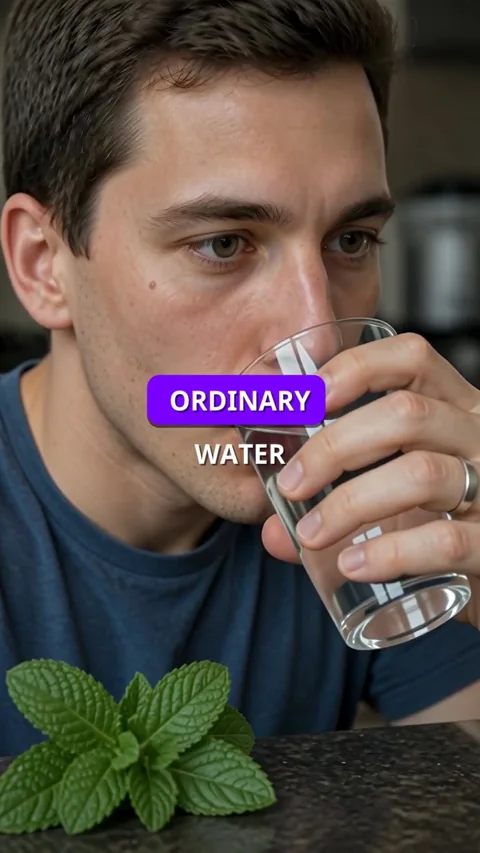
Our starting point is the illustrated preview from our finished mint-and-water episode. For this Instagram Reels script template we sampled the decoded RGB values in that specific 480 × 853 WebP. Open the original still at its native size. Count pixels from zero at the upper left, moving right for x and down for y.
| Object | Pixel (x, y) | Hex color |
|---|---|---|
| Mint leaf | 120, 737 | #50722B |
| Blue shirt | 95, 548 | #23374B |
| Glass | 409, 611 | #99A2A4 |
Sample the supplied still for these exact values. A screenshot of the moving demo has already passed through resizing and video encoding. Your Instagram Reels script template should name the master file whenever an editor needs an exact value. In the worked Instagram Reels script template, gray represents one reflection. A nearby pixel on the glass can be much darker.
Choose an Instagram Reels script template cover
What can a viewer tell from the grid?
“One still, three colors” gives the Instagram Reels script template a cover the picture can deliver. Try the alternative “A green you can use.” That line would call for a closer opening on the leaf and a much larger green sample at the end. Pick the cover before recording so the title and voice promise the same thing.
For a narrated Instagram Reels script template, try this line out loud. “The gray comes from the glass. Look just below the fingers.” Compare that take with reading six hex digits into a microphone. The first line tells a listener where to look. Keep the exact code on the card where a viewer can pause and copy it.
Silent Instagram Reels script template. Give each idea a visible action. Here the ring identifies the source, the name identifies the object and the swatch shows the color. Start the film at five seconds. The last card still lets you recover the missed color.
Finish the Instagram Reels script template with a reference card
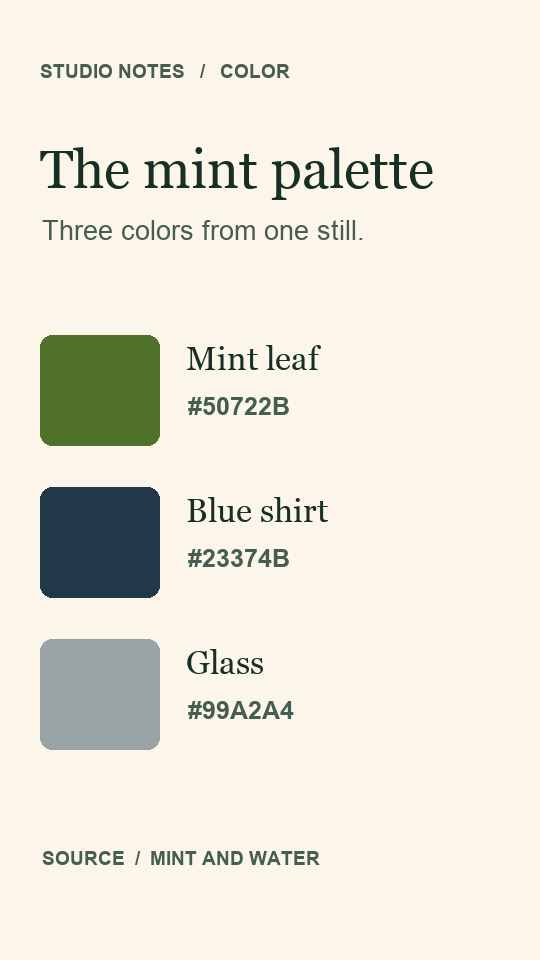
Download the finished palette card and open it as if a friend had sent it without the video. Can you identify all three values? In this Instagram Reels script template each code sits beside an object name and a color chip. A designer can rebuild the palette from that single image.
Test your Instagram Reels script template on a phone. Pause the last frame and read the middle value aloud. If you mix up a zero and a letter, enlarge those characters before you shorten the hold. The safe-zone checker can help you check where text falls near the controls.
What should go in the post caption?
Use the caption field in the Instagram Reels script template for something a reader can retrieve later. The example names the source and repeats the codes in plain text. A reader can copy one value from the caption. When adapting the Instagram Reels script template, replace the source name as carefully as you replace the numbers.
Adapt the Instagram Reels script template to another subject
Suppose you sort three nearly identical charging cables by where they belong. Write “Which cord goes in the travel bag?” on your Instagram Reels script template. Film the drawer, then each connector beside its label. Mark the matching shots on the Instagram Reels script template before you put everything away.
Now design the ending of that Instagram Reels script template. Arrange the three tagged cables beside the devices you use them with. Put the everyday names on the card, such as desk lamp, headphones and travel charger. Check each pairing yourself before you film. Match each line of the Instagram Reels script template to a tested pair.
Photograph the finished arrangement and try your cover over it. To keep the answer hidden, crop in on the tags. Keep that decision on the Instagram Reels script template beside the first shot.
Hand off your Instagram Reels script template
Give the editor the source visual, the approved script and a copy of the final card. Read each time range in the Instagram Reels script template beside the file it describes. If a range asks for something you never filmed, mark a pickup shot or rewrite the line before you pack up.
Copy the finished Instagram Reels script template into your production notes or download it as a text file. You can also take it into Series setup as the first episode brief. For cover selection and account settings after editing, use the Instagram production guide. File the approved Instagram Reels script template with your finished cut.
Return to the Instagram Reels script template