Start with the last shot you need
What should the last shot prove? For hands-only faceless Instagram Reels, film something somebody else can repeat. Try a roll of clear tape. Show a hand finding the folded tab and peeling the tape cleanly. Once you have the ending, the earlier shots show how the tab got there.
Fiction gives faceless Instagram Reels a different kind of ending. In our camera story, the narrator has to decide what to do after seeing a photograph. Borrow the relationship between object and decision for your own story. Change the event, the pictures and the choice.
If you are learning how to make faceless Instagram Reels on your phone, rest it on books above the table. Check for reflections. A shiny worktop can reveal your face even with the lens pointing down.
How to make faceless Instagram Reels with three shots
Show how hard the tape edge is to find
Lay dark paper under the clear roll. For instructional faceless Instagram Reels, contrast can do the work of a spoken explanation. Record a tight shot of a fingertip passing over the nearly invisible edge. Leave a little room at the end of each take for faceless Instagram Reels you plan to edit on your phone. Those spare frames give you a clean place to cut.
Film the fold in close-up
Keep the phone still. Peel a strip, fold the last centimeter back and press the sticky faces together. In close-up faceless Instagram Reels, hands can hide the action. Repeat the fold with your fingertips lower until the crease is visible.
Show the tab lifting the tape
Rotate the roll for the closing shot and use the tab to find the end. A voice track for these faceless Instagram Reels could run, “Leave yourself a handle. Fold the last bit sticky-side in. Next time, the smooth end lifts straight off.” Learning how to make faceless Instagram Reels without recording a voice? Use the same sequence with a short written instruction at the fold.
When several faceless Instagram Reels share a workbench, keep a photograph of the setup. After lunch, match the roll and the shadow to that picture before filming another take.
How to make faceless Instagram Reels from an illustrated story
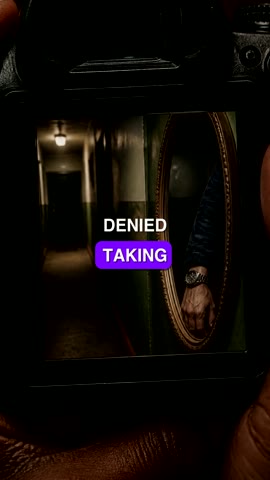
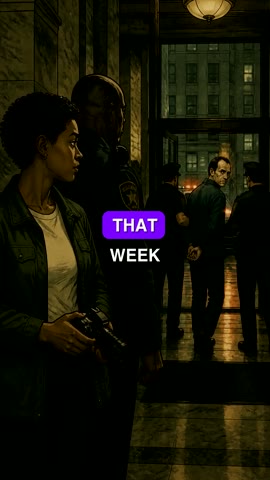
Play the camera story above, then inspect these stills extracted from the same MP4. For creators learning how to make faceless Instagram Reels with illustrations, this finished fictional film from FacelessReels shows where words and images meet. The cover and post caption below are our proposed edits for an Instagram draft.
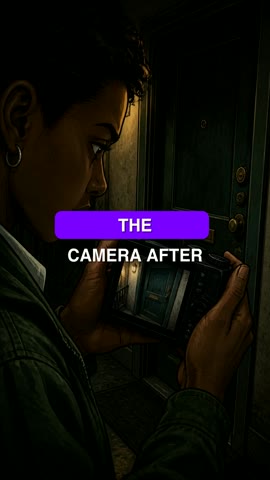
At one second the subtitles read “the camera after.” That fragment works in motion. Alone on the grid, it sounds unfinished. When selecting covers for faceless Instagram Reels, pause and read the words as a title. Here we would use the clean illustration with “The photo on the camera.” It names the clue and leaves the decision open.
At fifteen seconds the corridor occupies only part of the camera display. For faceless Instagram Reels with a picture inside a picture, watch at arm’s length. If the clue disappears, hold the shot longer or crop into the display.
At thirty-six seconds, listen without looking, then watch silently. Story-led faceless Instagram Reels need a recognizable ending in both passes. Note the timestamp if a name, object or decision changes between them.
Time the voice and subtitles in faceless Instagram Reels
Record a scratch voice track before adding music. For faceless Instagram Reels made at a desk, speak each instruction while doing it. Say “sticky-side in” as the adhesive meets. Trim the silence and leave the crease visible until the phrase ends.
Watch your faceless Instagram Reels once with sound off. Ask somebody to point to the moment the problem is solved. If they identify the final pull but miss the fold, move the subtitle away from the fingertips. For narrated faceless Instagram Reels, correct the words against what the voice actually says. A subtitle that drops a tiny word like “in” can reverse an instruction.
Export faceless Instagram Reels with a clearly named master. Open it from your gallery. If two sets of captions overlap after import, check the embedded text and Instagram’s caption layer. Choose one readable caption layer for your faceless Instagram Reels. The Reels size and crop checker can help when the problem is framing.
Package faceless Instagram Reels for the profile grid
Start a Reel in the Instagram mobile app and select the export. If several faceless Instagram Reels look identical in the gallery, compare the closing line with the approved cut before opening the sharing screen.
A cover for practical faceless Instagram Reels should still explain the subject at profile-grid size. For the tape demonstration, photograph the finished tab against the dark paper and try “Find the tape end.” For narrative faceless Instagram Reels, pick a still with an unresolved detail. Preview each cover wherever the app offers a crop and keep the critical object visible.
Write post captions for practical faceless Instagram Reels as notes a reader can use later. Try “I fold the last centimeter back before putting the roll away. The smooth tab leaves enough room for a fingernail.” Give fictional faceless Instagram Reels a genre cue. Our caption draft reads, “An original short mystery about a secondhand camera and a photograph its new owner can’t explain.”
A final check for faceless Instagram Reels covers the account, audience and applicable disclosure settings. Save and reopen the draft on your phone. Review the cover, opening line and last subtitle. If a teammate publishes your faceless Instagram Reels, hand over the master, cover and approved copy so they can prepare the post on their device.
How to make faceless Instagram Reels without posting twice
You can publish faceless Instagram Reels manually from your Instagram account. Use that route when you want to choose native music, adjust a cover in the app or keep an individual draft for review. Listen through the phone speaker, verify the account name, then share. Keep the post link with the master.
To schedule faceless Instagram Reels with a paid FacelessReels Series, connect an Instagram business or creator account. In Series publishing, enable Instagram, select the account and save. Select Review each video when an editor must approve the finished work. The cut waits for approval in FacelessReels. Open the Instagram app separately if you need a native draft.
Select Publish automatically for scheduled faceless Instagram Reels only after you have checked the destination and the share-to-feed preference. Give each cut one publisher. Check its Series status before retrying manually, or you may post the story twice.
Compare faceless Instagram Reels by looking for a specific edit to try. If a viewer asks which side to fold, refilm the crease. If retention dips during the corridor shot, inspect the image at phone size. Try a closer crop in the next episode and record what changed.